RFID Label Printers: Complete Buying Guide for Warehousing and Logistics
RFID Label Printers: Complete Buying Guide for Warehousing and Logistics
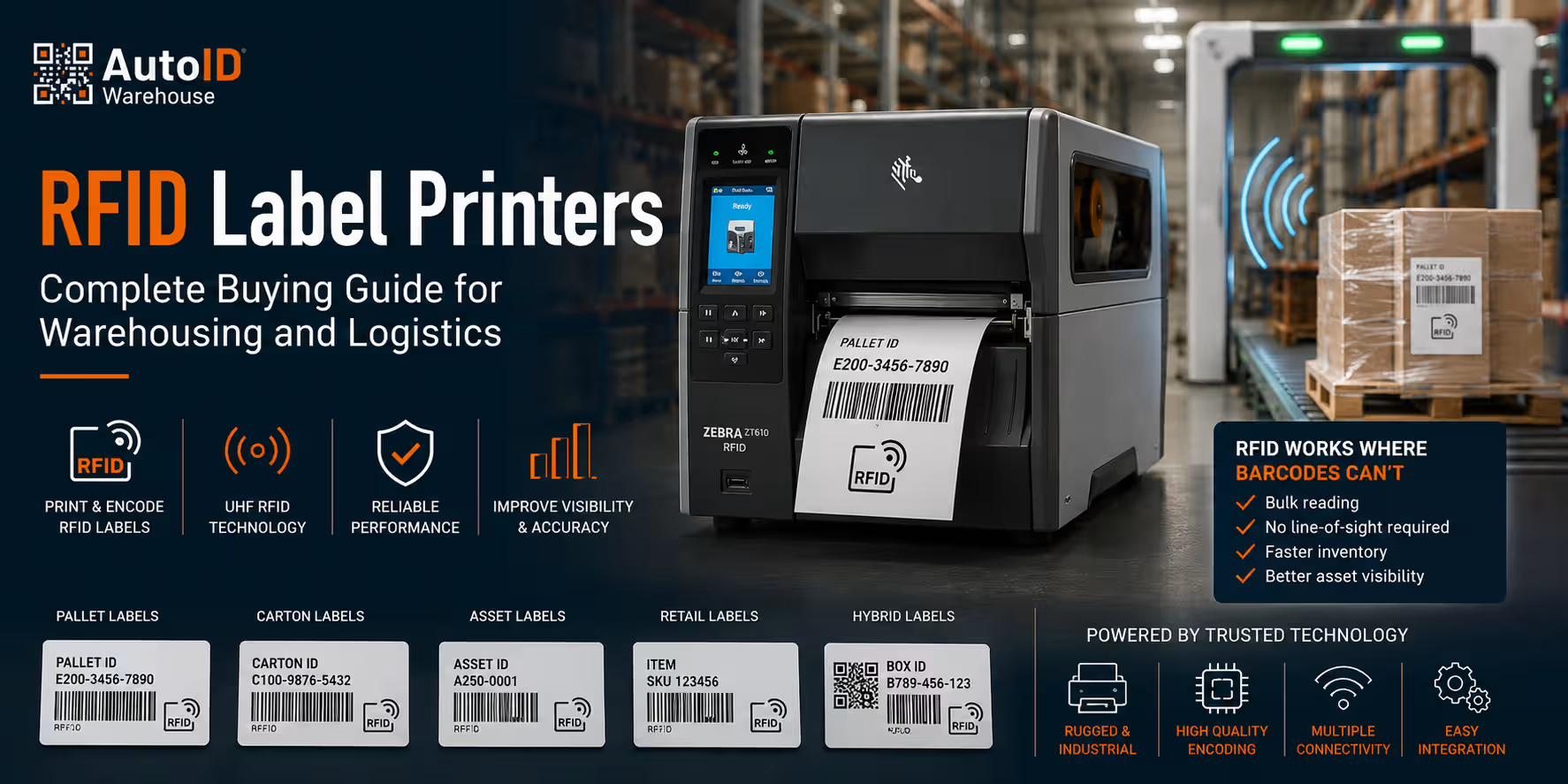
An RFID label printer is more than a standard barcode label printer. It prints the visible information on the label and also encodes data into the RFID inlay inside the label. This allows warehouses, logistics centers and production environments to identify items, cartons, pallets or assets without requiring direct line-of-sight scanning.
For operations that need faster inventory counts, better asset visibility, pallet tracking or automated identification, RFID printers can offer major advantages over traditional barcode-only labeling. However, RFID is not suitable for every workflow. The printer, RFID label, inlay, software and reader infrastructure must all be compatible.
This guide explains how to choose the right RFID label printer for warehousing and logistics, including when RFID is better than barcode labels, what components are required, how UHF RFID encoding works, how to check label compatibility and which warehouse use cases benefit most from RFID technology.
Need help before buying? Ask for an RFID printer + RFID label compatibility check.
What Is an RFID Label Printer?
An RFID label printer is a printer/encoder designed to produce RFID smart labels. These labels include a printable surface and an embedded RFID inlay made of an antenna and chip. The printer prints human-readable text, barcodes or graphics on the surface, while the RFID encoder writes digital data to the chip.
A standard label printer can print barcode labels, but it cannot encode RFID data unless it has RFID printer/encoder functionality. This is the key difference. RFID printing requires the printer to detect the RFID inlay position, write data to the chip, verify the encoding and reject or mark failed labels if encoding is unsuccessful.
RFID label printers are commonly used for:
- Pallet tracking
- Carton identification
- Asset management
- Inventory visibility
- Retail item-level tagging
- Manufacturing traceability
- Logistics and supply chain workflows
- Returnable transport item tracking
- Warehouse automation projects
For available models, visit the RFID label printers category.
When Is RFID Better Than Barcode Labels?
Barcode labels are reliable, affordable and widely used in warehouses. They are still the right choice for many operations. RFID becomes more valuable when the workflow requires faster identification, bulk reading, less manual scanning or visibility without direct line-of-sight.
With barcode scanning, an operator usually has to see the label and scan it directly. With RFID, multiple tags can be read automatically by an RFID reader, depending on the environment, tag type, reader setup and application design.
| Requirement | Barcode Labels | RFID Labels |
|---|---|---|
| Low-cost product identification | Excellent | Usually more expensive |
| Line-of-sight scanning | Required | Not always required |
| Single-item verification | Excellent | Good |
| Bulk reading | Limited | Strong |
| Fast inventory counting | Manual and slower | Faster when implemented correctly |
| Automated portals or dock doors | Limited | Strong |
| Basic shipping labels | Excellent | Often unnecessary |
| Asset and pallet visibility | Good | Very strong |
RFID is usually better when you need to identify many objects quickly, track pallets or assets through zones, reduce manual scanning or automate data capture at dock doors, conveyor points or warehouse gates.
RFID Label Printer vs Standard Barcode Label Printer
A standard barcode printer prints visual data. An RFID printer prints visual data and encodes the RFID chip. That means RFID printers have additional hardware and software functions that must be configured correctly.
| Feature | Barcode Label Printer | RFID Label Printer |
|---|---|---|
| Prints text and barcodes | Yes | Yes |
| Encodes RFID chip | No | Yes |
| Requires RFID labels | No | Yes |
| Checks RFID encoding | No | Yes |
| Used with RFID readers | Not required | Usually required |
| Best for simple labels | Yes | Sometimes unnecessary |
| Best for advanced traceability | Limited | Yes |
If your warehouse only needs shipping labels, shelf labels or basic product barcodes, a standard label printer may be enough. If you need RFID-based asset visibility, pallet tracking or automated identification, you need an RFID printer.
What Components Are Required for an RFID Printing System?
An RFID printer is only one part of the complete system. To create a functional RFID workflow, you need compatible hardware, labels, software and readers.
1. RFID Label Printer / Encoder
The RFID printer prints the visible label and encodes the RFID chip. It must support the RFID frequency, label size, inlay type and application requirements. Industrial RFID printers are usually preferred for high-volume warehouse and logistics environments.
2. RFID Labels or Tags
RFID labels include an embedded inlay. The inlay must be compatible with the printer and suitable for the item being tagged. For example, a label used on a cardboard carton may not perform the same way on metal, liquid containers or reusable plastic boxes.
You can review RFID consumables such as Zebra ZBR4005 inlay RFID tags when planning compatibility.
3. RFID Encoding Software
The software sends the correct data to the printer and controls what is printed and encoded. This may be label design software, WMS, ERP, middleware or a custom warehouse application.
4. RFID Readers and Antennas
RFID readers are used to read the encoded labels after printing. These may be handheld RFID readers, fixed readers, dock door portals, conveyor readers or antennas installed at key process points.
5. WMS, ERP or Inventory Integration
The RFID data should connect to your warehouse system. This allows inventory movements, asset status, pallet IDs or shipment events to be recorded automatically.
6. Testing and Validation
RFID projects require testing. The label must encode correctly, read reliably and perform well on the actual item, carton, pallet or asset.
Understanding UHF RFID
Most warehouse and logistics RFID applications use UHF RFID, commonly associated with long-range and supply chain use cases. UHF RFID is widely used for pallet tracking, carton tracking, inventory management, asset tracking and logistics visibility.
UHF RFID labels are commonly chosen because they can support practical read ranges for warehouse workflows when the correct reader, antenna, label and environment are used. However, performance can vary significantly depending on the tagged material, tag orientation, surrounding objects and reader setup.
Common UHF RFID warehouse use cases include:
- Reading pallets through dock door portals
- Tracking cartons on conveyors
- Counting tagged inventory with handheld RFID readers
- Identifying returnable transport items
- Tracking tools, assets and containers
- Improving outbound shipment verification
How RFID Encoding Works
RFID encoding is the process of writing digital information to the RFID chip inside the label. During printing, the RFID printer positions the label, communicates with the inlay, writes the required data and verifies that the encoding was successful.
The encoded data may include:
- Unique item ID
- Serialized product code
- Pallet ID
- Carton ID
- Asset number
- Batch or lot reference
- Shipment reference
- Location or process data
In many applications, the RFID label also includes a printed barcode. This creates a hybrid label that can be read by both barcode scanners and RFID readers. Hybrid labels are useful because they provide a fallback method if RFID reading is not available at a specific point in the workflow.
RFID Label Compatibility: Why It Is Critical
RFID label compatibility is one of the most important parts of any RFID printer project. Not every RFID label works with every printer or every application. The label must match the printer’s encoding position, media specifications, inlay placement and real-world use case.
Before choosing an RFID printer or RFID labels, check:
- Label width and height
- Inlay position inside the label
- Gap or pitch between RFID inlays
- Printer RFID encoding capability
- Application surface: cardboard, plastic, metal, glass or liquid
- Required read distance
- Indoor or outdoor use
- Environmental exposure
- Barcode and human-readable print requirements
- WMS or ERP data structure
RFID performance can change depending on the surface where the label is applied. Standard RFID labels often work well on cardboard, but metal surfaces or liquid-filled products may require special RFID labels designed for those materials.
Before ordering in volume, always test RFID labels with the actual product, package, pallet or asset.
Types of RFID Label Printers
Desktop RFID Printers
Desktop RFID printers are suitable for lower-volume applications, office labeling, retail tagging, asset labeling or small warehouse projects. They are compact and easier to place on a desk or workstation.
Best for: small batch RFID labeling, item-level tagging, asset labels and lower-volume workflows.
Industrial RFID Printers
Industrial RFID printers are built for higher-volume and more demanding environments. They are typically used in warehouses, logistics centers, manufacturing facilities and distribution operations where RFID labels are printed regularly.
Best for: pallet labels, carton labels, logistics labels, production labels, high-volume asset labeling and warehouse integration.
Mobile RFID Printing
Mobile RFID printing can be useful when labels need to be printed and applied directly at the point of work. This may include inventory corrections, mobile receiving, maintenance, field operations or asset tagging.
Best for: mobile asset labeling, on-site tagging, field service and flexible warehouse workflows.
RFID Print Engines
RFID print engines are used in automated print-and-apply systems. They are designed for production lines, conveyor labeling and automated logistics applications where labels are printed, encoded and applied without manual handling.
Best for: automated pallet labeling, carton labeling, conveyor applications and high-speed production environments.
RFID Printer Selection by Warehouse Use Case
| Use Case | Recommended RFID Printer Type | Key Requirement |
|---|---|---|
| Pallet tracking | Industrial RFID printer | Large durable labels, reliable UHF encoding |
| Carton tracking | Industrial or desktop RFID printer | Consistent encoding and barcode print quality |
| Asset management | Desktop, mobile or industrial RFID printer | Durable labels matched to asset surface |
| Retail item-level tagging | Desktop or industrial RFID printer | High encoding accuracy and compact labels |
| Manufacturing traceability | Industrial RFID printer | Durable media and system integration |
| Automated logistics | RFID print engine or industrial printer | Print-and-apply compatibility |
| Warehouse inventory | Industrial RFID printer | Reliable labels readable by handheld or fixed RFID readers |
RFID Labels for Pallets, Cartons and Assets
Pallet RFID Labels
Pallet RFID labels are used to identify full pallets in receiving, storage, movement and dispatch. They may include a printed barcode, pallet ID, shipment reference and encoded RFID data. These labels are usually larger and should be positioned where readers can detect them reliably.
Carton RFID Labels
Carton RFID labels are used for case-level tracking. They can help automate carton identification on conveyors, at packing stations or through dock doors. Label position and orientation are important for consistent reading.
Asset RFID Labels
Asset RFID labels are used to track equipment, tools, containers, IT devices, returnable transport items and other valuable objects. The correct label depends heavily on the asset surface and environment.
Product RFID Labels
Product RFID labels are used for item-level tagging, especially in retail, manufacturing and regulated workflows. Smaller products may require compact RFID inlays and careful testing.
RFID Printer Resolution and Print Quality
RFID encoding is critical, but print quality still matters. Many RFID labels also include text, barcodes, QR codes or product information. If the printed barcode is unreadable, the label loses an important backup identification method.
| Resolution | Best For | Typical RFID Label Use |
|---|---|---|
| 203 dpi | Standard labels | Pallet labels, carton labels, large logistics labels |
| 300 dpi | Sharper text and smaller labels | Product labels, asset labels, smaller RFID tags |
| 600 dpi | Very small or dense labels | Compact item-level labels and technical applications |
For most warehouse RFID labels, 203 dpi or 300 dpi is enough. If the label includes small text, compact barcodes or dense data, 300 dpi may be the safer choice.
Zebra RFID Printers and Industrial RFID Workflows
Many warehouse buyers compare industrial RFID models such as Zebra ZT610 RFID, ZT400 RFID-class printers and current Zebra RFID printer configurations when planning logistics or warehouse RFID projects. The right model depends on print volume, label size, resolution, connectivity, encoding requirements and availability.
For warehouse operations that already use Zebra label printers, choosing a Zebra RFID printer can simplify user training, printer management and integration planning. For example, the Zebra ZT421 label printer can be relevant when comparing industrial label printer platforms and RFID-capable configurations.
Before choosing any RFID printer model, confirm:
- RFID encoder availability for the configuration
- Supported RFID label sizes
- Printer resolution
- Connectivity options
- Expected print volume
- Software and driver compatibility
- RFID label compatibility
- Service and spare parts availability
Common RFID Printer Mistakes to Avoid
Choosing the Printer Before Testing the RFID Label
RFID projects should not start with the printer alone. The label and application surface are just as important. Always test the RFID label on the real item before committing to volume production.
Assuming All RFID Labels Work the Same
RFID labels vary by inlay, antenna design, size, material and intended use. A label that works on cardboard may not work correctly on metal or liquid-filled products.
Ignoring Reader Infrastructure
An RFID printer creates the label, but RFID readers capture the data in the warehouse. If the reader setup is poorly planned, the printed labels may not deliver the expected results.
Using RFID Where Barcode Labels Are Enough
RFID is powerful, but it is not always necessary. For simple shipping labels or low-volume manual workflows, barcode labels may be more cost-effective.
Forgetting to Validate Encoding
RFID encoding should be verified during printing. A failed encoded label can create tracking errors later in the workflow.
Not Planning the Data Structure
RFID data should be structured correctly before implementation. Decide what will be encoded, how it connects to WMS or ERP records and how duplicate IDs will be avoided.
RFID Printer Buying Checklist
Before choosing an RFID printer, answer these questions:
- What objects will be tagged: products, cartons, pallets or assets?
- What surface will the RFID label be applied to?
- Do you need UHF RFID?
- What read distance is required?
- Will labels be read by handheld readers, fixed readers or portal readers?
- What label size is required?
- Do you need paper, synthetic or special RFID labels?
- Do labels need printed barcodes as a backup?
- What daily print volume is expected?
- Do you need desktop, industrial or mobile RFID printing?
- Will the printer connect to WMS, ERP or label design software?
- Do you need 203 dpi, 300 dpi or 600 dpi?
- Has the RFID label been tested on the real item?
How AutoID Warehouse Can Help
Choosing the right RFID label printer requires more than comparing printer specifications. The RFID label, inlay, printer encoder, reader setup and warehouse workflow must work together. A printer that is technically strong may still be the wrong choice if the RFID label does not match the application.
AutoID Warehouse can help you evaluate:
- RFID printers for warehouse and logistics operations
- Desktop vs industrial RFID printer options
- UHF RFID label compatibility
- RFID labels for cartons, pallets, assets and products
- Barcode + RFID hybrid label workflows
- RFID printer integration with WMS or ERP systems
- RFID label testing before volume purchase
- Zebra RFID printer and label configurations
Explore our RFID label printers, review compatible RFID consumables such as Zebra ZBR4005 inlay RFID tags or compare industrial label printer options such as the Zebra ZT421 label printer.
Need a recommendation? Ask for an RFID printer + RFID label compatibility check.
FAQ: RFID Label Printers
What is an RFID label printer?
An RFID label printer is a printer/encoder that prints visible information on a label and writes digital data to the RFID chip embedded inside the label. It is used to create RFID smart labels for tracking products, cartons, pallets, assets and logistics items.
What is the difference between an RFID printer and a barcode printer?
A barcode printer only prints visible text and barcodes. An RFID printer prints the label and also encodes data into the RFID chip. RFID labels can then be read by RFID readers, often without direct line-of-sight.
When should a warehouse use RFID instead of barcode labels?
A warehouse should consider RFID when it needs faster inventory counts, pallet tracking, asset visibility, automated dock door reading or bulk identification. Barcode labels remain a good choice for simple, low-cost, direct-scan workflows.
Do RFID label printers need special labels?
Yes. RFID printers require RFID labels or tags with embedded inlays. The label must be compatible with the printer, encoding position, application surface and required read distance.
Can RFID labels also include printed barcodes?
Yes. Many RFID labels include both encoded RFID data and a printed barcode. This hybrid approach provides flexibility because the label can be read by RFID readers and barcode scanners.
What is UHF RFID used for in warehouses?
UHF RFID is commonly used for pallet tracking, carton tracking, inventory visibility, asset management, dock door reading and logistics workflows where longer read range or bulk reading is required.