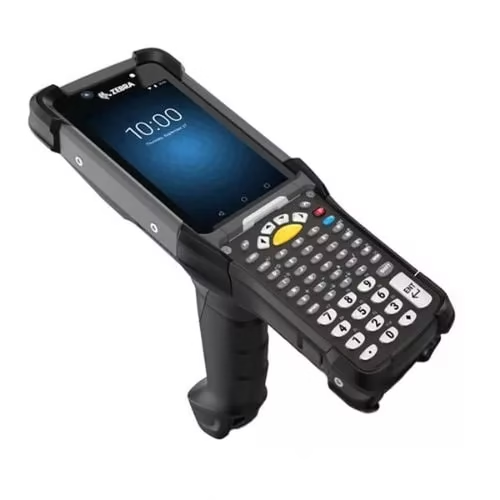
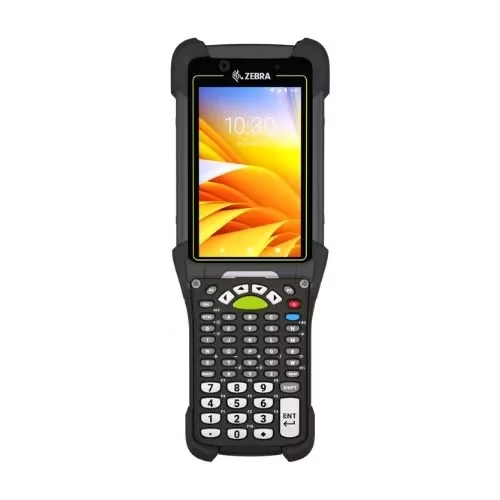
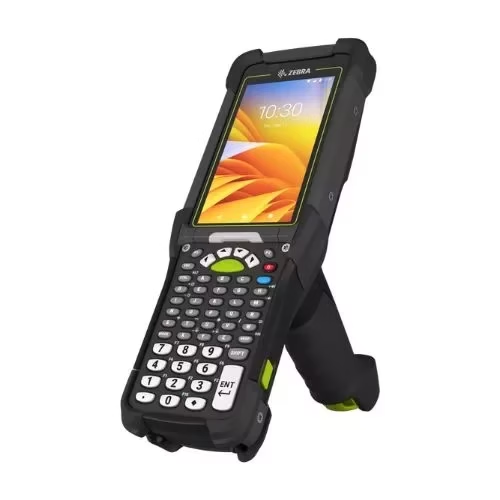
Introducing the Zebra MC9300 mobile computer, the next evolution of Zebra’s most reliable Android mobile computer for enterprises today. When your business demands the best, the MC9300 offers the best Android platform, optimal application support, an ultra-rugged design and the best accessory system. An ideal choice for businesses looking to optimize their operations and increase productivity.
Zebra MC9300 Mobile Terminal – has a bright screen with a sensitive touch panel, an integrated 1D/2D scanner and an 8 megapixel camera, which can perform up to 100 scans per second, It has a dual-core Qualcomm Snapdragon 660 octa-core processor and 4 GB of RAM, which ensures good speed and reliability, It also has NFC, 4G, Wi-Fi, Bluetooth and GPS connectivity, The 4500 milliamp battery is compatible with Zebra Power Smart technology, providing up to 8 hours of operating time,
In today’s competitive world, businesses are always looking for ways to improve their operations and to increase productivity, One way to do this is to implement the latest technology designed to improve workflows and reduce errors, One of these technologies is the Zebra MC9300 Mobile Terminal, a device that offers businesses a wide range of features and capabilities to help boost efficiency and productivity across various industries,
A model for the most challenging environments
The Zebra MC9300 mobile terminal is a durable and portable device that offers businesses a wide range of features to improve operations and increase productivity, It is designed to withstand harsh environments, making it ideal for industries such as manufacturing, retail and logistics, It runs on the latest Android operating system, making it easy to use and compatible with a wide range of enterprise applications,
Terminal emulation – advanced technology
The device also offers a range of software applications designed to optimize workflows and increase productivity, For example, the MC9300’s Mobility DNA application suite includes tools for device management, application development and data capture, all of which can help businesses improve operations and increase productivity,
Integrated support for your applications makes it easy to migrate from Windows to Android without changing the backend or training users, plus when you want to transform your “green screen” applications into intuitive and elegant, touch-centric screens to increase productivity, Mobility DNA’s All-touch TE will simplify the process,
Advanced industrial scanning and an extraordinary range of accessories
With advanced industrial scanning and an extraordinary range of scanning options, the ability to detect the smallest details and obtain precise images of scanned objects,
The SE4850 extended range imager captures barcodes from 7 cm to a distance of 22 meters, while the SE4770 and SE4750 are ideal for standard scanning range, the SE4750 DPM enables fast and reliable capture of almost every direct part marking, in addition, the SE965 1D engine offers adaptive scanning technology with the widest working range in its class,
Finally, the MC9300 also offers a wide range of configurations and accessories, such as printers and scanners, that can be used to improve operations and efficiency, With its robust design, advanced features and wide range of configurations and accessories, the Zebra MC9300 Mobile Terminal is an ideal choice for businesses looking to optimize their operations and increase productivity,
The various configuration options for the MC9300 model
Model
Description
MC9300 Standard
Zebra MC9300 standard model (different configurations available)
MC9300 NFC Haptics Camera
Zebra MC9300 NFC model with haptic feedback, and camera (different configurations available)
MC9300 Freezer
Zebra MC9300 model for freezers -30°C (different configurations available)
MC9300 NFC Haptics
Zebra MC9300 NFC model with haptic feedback (different configurations available)
MC9300 DPM
Zebra MC9300 model with DPM Imager (different configurations available)
CONFIGURATION OPTIONS
MC9300
OPTION
DESCRIPTION
Wireless option
MC930X-XXXXXXXX
0
WLAN 802.11 a/b/g/n/ac MU-MIMO & BT 5.0 BLE
RFID
MC93XB-XXXXXXXX
B
None
MC93XP-XXXXXXXX
P
HF RFID radio with NFC
Shape
MC93XX-GXXXXXX
G
Gun
Operating Temperature
MC93XX-XSXXXXXX
S
Standard
MC93XX-XFXXXXXX
F
Freezer
Data Capture / Camera
MC93XX-XXAXXXXX
A
SE965 1D Laser
MC93XX-XXBXXXXX
B
SE965 1D Laser + Front/Rear Camera
MC93XX-XXCXXXXX
C
SE4750 2D Imager (EOL, replaced with SE4770)
MC93XX-XXDXXXXX
D
SE4750 2D Imager + Front/Rear Camera (EOL, replaced by SE4770)
MC93XX-XXHXXXXX
H
SE4770 2D Imager
MC93XX-XXJXXXXX
J
SE4770 2D Imager + Camera front/back
MC93XX-XXEXXXXX
E
SE4850 2D imager
MC93XX-XXFXXXXX
F
SE4850 2D imager + Front/rear camera
MC93XX-XXGXXXXX
G
SE4750 DPM
MC93XX-XXWXXXX
W
SE4750 DPM with angle wide
Keyboard
MC93XX-XXXAXXXX
A
29 keys
MC93XX-XXXBXXXX
B
34 keys
MC93XX-XXXCXXXX
C
43 key
MC93XX-XXXDXXXX
D
53 Alpha Numeric keys
MC93XX-XXXEXXXX
E
53 keys VT Alpha Numeric
MC93XX-XXXFXXXX
F
53 keys 3270 Alfa Numeric
MC93XX-XXXGXXXX
G
53 keys 5250 Alfa Numeric
MC93XX-XXXHXXXX
H
58 Alpha Numeric keys
Operating System
MC93XX-XXXXAXXX
A
Android AOSP
MC93XX-XXXXGXXX
G
Android GMS
Memory
MC93XX-XXXXX4XX
4
4 GB RAM / 32 GB Flash
Region
MC93XX-XXXXXXNA
NA
North America (USA, Canada, Puerto Rico)
MC93XX-XXXXXXRW
RW
Rest of the World (excluding North America, China and India)
MC93XX-XXXXXXCN
CN
China
MC93XX-XXXXXXIN
IN
India
Additional features
MC93XX-XXXXXXXXX-NI
NI
Fire Fighting (Class I, Div II)
MC93XX-XXXXXXXX-TA
TA
According to TAA (Trade Agreement Act)
MC93XX-XXXXXXXX-TI
TI
Complies with TAA (Trade Agreement Act), fireproof (Class I, Div II)
Configuring the MC9300 is the right model an important process that can significantly improve the performance and efficiency of business operations, Consider the options available for selecting the operating system, memory and storage, and data capture capabilities, By selecting the appropriate configuration, you can ensure that the MC9300 is optimized to meet the unique needs of your business,
Need help?
Technicians AutoID experts can help you choose the configuration that best suits your business needs, Contact AutoID today for your own customized solution,
Availability
Loading...
Accessories
Loading...
Services
Loading...
Software/Apps
Loading...
Reviews
There are no reviews yet.
Only logged in customers who have purchased this product may write a review.






Reviews
There are no reviews yet.