




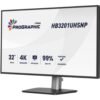


Monitor 32″ 4K UHD HB3201, IPS Black 2.0, USB-C 96W, KVM, RJ45, HDR400, Pantone Validated – iiyama HB3201UHSNP-B1
1.131,35 € incl. VAT
iiyama ProGraphic HB3201UHSNP-B1 professional monitor, 32″ 4K IPS Black, 99% DCI-P3, Pantone Validated, AGLR, HDR400, USB-C dock 96W with LAN, KVM and USB hub, ideal for design, photo and content creation.

Professional Monitor 32″ 4K IPS Black, Pantone, USB-C 96W & KVM – iiyama ProGraphic HB3201UHSNP-B1
iiyama ProGraphic HB3201UHSNP-B1 is a professional monitor of 32″ 4K UHD designed for those who live from the image: designers, photographers, video editors and content creators. It is the combination of premium IPS Black 2.0 panel, Pantone validated color, modern connection via USB-C 96W and complete ergonomics – in other words, the “command center” ideal for a serious studio.
The IPS Black 2.0 technology raises the bar for IPS panels: you get 3000:1 contrast and much deeper black than on a conventional IPS. This means you can clearly see shadow details, fine tone transitions and subtle differences in luminance, as you should, without straining your eyes or having to “guess” what’s happening in the dark areas of the image.
When it comes to color, the HB3201UHSNP-B1 plays in the professional league: it covers 99% of the DCI-P3 space and 100% sRGB, with 1.07 billion colors and Delta E < 2. The screen is Pantone Validated, which guarantees you accurate reproduction of Pantone colors – extremely important for visual identities, packaging, print and any project where brand colors need to be perfect, not “almost”.
The AGLR (Anti-Glare Low Reflective) layer and matte coating keep reflections under control, so you can work comfortably in both a bright studio and an office with large windows. The 450 cd/m² brightness, combined with HDR400 certification, helps you more accurately evaluate high-contrast scenes, highlights, and bright areas, whether you’re working for the web, video, or print.
The ProGraphic HB3201UHSNP-B1 is also a full USB-C dock. Through the USB-C port with 96W Power Delivery:
send the 4K video signal to the monitor,
charge your laptop up to 96W,
have access to RJ45 LAN for a stable wired network,
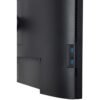
use the integrated USB hub (3 x USB-A + 1 x USB-C) for mouse, keyboard, graphics tablet, external HDD or webcam.
Basically, a single USB-C cable, and the monitor takes care of the rest. You also have HDMI 2.0 plus DisplayPort 1.2, and via DisplayPort-out (MST daisy-chain) you can connect a second monitor directly to the HB3201UHSNP-B1 – perfect if you want a dual 4K display setup without cluttering your graphics station with adapters.
A major advantage for modern workflows is the integrated KVM switch. You can connect two systems (e.g., your work laptop and your personal PC) and use the same set of peripherals – mouse, keyboard, graphics tablet. You change the video source from the OSD, and the KVM automatically moves the peripherals, without the hassle of cables or keeping two keyboards on your desk.
For working with multiple sources simultaneously, the monitor offers PiP (Picture-in-Picture) and PbP (Picture-by-Picture) modes. You can display two systems or two different inputs on the same screen: one in a corner window or two columns side by side. It’s ideal when comparing images, monitoring two streams or working with a live-preview and a timeline in parallel.
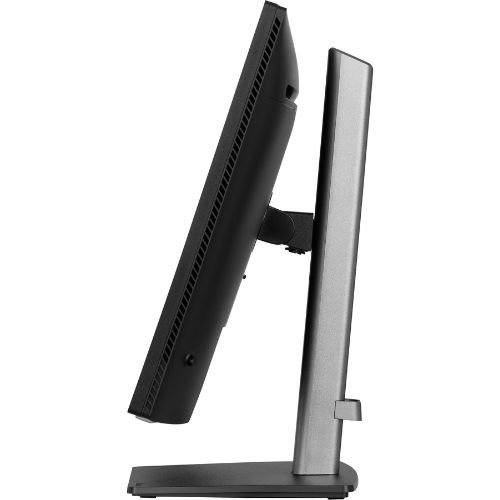
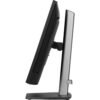
Ergonomics are at the level of „all day use”:
150 mm adjustable height,
pivot 90° (you can rotate the screen to portrait for vertical layouts, code or long documents),
swivel 360° (180° left / 180° right),
tilt 23° up and 5° down.
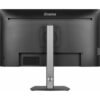
The 4-side edge-to-edge design (ultra-thin bezel on all sides) looks flawless on your desk and is perfect for multi-monitor setups. The cable management system in the leg helps you hide the wires, so that the setup remains clean and professional.
When it comes to visual comfort, you have Low Blue Light Panel, Flicker Free technology, EyeComfort mode and Eyesafe® certification, so you can work for hours with much reduced eye fatigue – very important during long editing days. The integrated 2 x 2.5W speakers are sufficient for calls, video previews and tutorials, and for serious audio monitoring you can connect headphones directly to the 3.5 mm jack.
With a typical consumption of only 32 W, internal power supply, environmental and quality certifications and all necessary cables included (power, USB, HDMI, DisplayPort, USB-C), iiyama ProGraphic HB3201UHSNP-B1 is a complete solution for studios, agencies and freelancers who want a 32″ 4K monitor with reference image, 96W USB-C dock, KVM and top ergonomics.
Specifications technical
| Parameter | Value |
|---|---|
| Model | iiyama ProGraphic HB3201UHSNP-B1 |
| Range | ProGraphic – Desktop Monitors |
| Screen diagonal | 31.5″ / 80 cm (segment 32″) |
| Technology panel | IPS Black 2.0, matte finish, AGLR (Anti-Glare Low Reflective) |
| Case design | 4-side edge-to-edge, ultra-thin bezel |
| Native resolution | 3840 x 2160 @ 60Hz (4K UHD, 8.3 megapixels) |
| Aspect ratio | 16:9 |
| Panel brightness | 450 cd/m² |
| Static contrast | 3000:1 |
| Advanced Contrast (ACR) | 80,000,000:1 |
| Response Time (GTG) | 4 ms |
| Viewing angle | 178°/178° (right/left 89°/89°, up/down 89°/89°) |
| Color Support | 1.07 billion (8-bit), DCI-P3 99%, sRGB 100% |
| Delta E | < 2.0 |
| Horizontal Sync | 30 – 140 kHz |
| Viewable Area (W x H) | 697.3 x 392.2 mm, 27.5 x 15.4″ |
| Pixel pitch | 0.182 mm |
| Case color | Black, matte |
| Video inputs | 1 x HDMI 2.0 |
| DisplayPort input | 1 x DisplayPort 1.2 |
| USB-C input | 1 x USB-C (Power Delivery 96W, video + data) |
| Video output | 1 x DisplayPort (MST daisy-chain, max. 2560 x 1440) |
| USB HUB | 4 x USB (3 x USB-A 3.2 Gen 1 5Gbps/4.5W, 1 x USB-C 5Gbps/15W) |
| USB-C DOCK | 1 x USB-C dock (PD 96W, LAN, DP out – DP out functions limited on Mac, USB 3.2 Gen 1 5Gbps) |
| Connector LAN | 1 x RJ45 (LAN) |
| KVM switch | Yes, peripheral switching between HDMI / DP / USB-C |
| HDCP compatibility | Yes |
| Headphone jack | Yes, 3.5 mm jack |
| Built-in speakers | 2 x 2.5 W |
| Visual comfort technologies | Low Blue Light Panel, Blue Light Reducer, Flicker Free, EyeComfort, Eyesafe® Certified |
| HDR | HDR400 |
| Image Functions | i-Style color, 6-axis color, ACR, Eco, OD, gamma, color space, RGB range, color temp., user preset |
| PiP/PbP features | PiP/PbP, sub source, PiP position, PiP size, swap, audio input |
| OSD languages | EN, DE, FR, ES, IT, RU, JP, CZ, NL, PL, UA |
| OSD Controls | Joystick/Power: Up/Input Select, Down/Shortcut, Right/Shortcut, Left/Shortcut |
| Extra Features | Kensington-lock ready, DDC/CI, DDC2B |
| Screen Position Adjustments | Height, swivel, tilt, pivot (rotation îin both directions) |
| Height Adjustment | 150 mm |
| Pivot (rotation) | 90° (portrait/landscape mode) |
| Swivel | 360° (180° left / 180° right) |
| Inclination angle (tilt) | 23° up; 5° în down |
| Cable management system | Yes |
| VESA mount | 100 x 100 mm |
| Cables included | Power cable (1.8 m), USB cable (1.8 m), HDMI cable (1.8 m), DisplayPort cable (1.8 m), USB-C cable (1.0 m) |
| Other accessories | Quick Start Guide, Safety Guide |
| Power supply power | Internal |
| Power | AC 120 – 240 V, 50/60 Hz |
| Power consumption (typical) | 32 W, 0.5 W stand-by, 0.3 W off mode |
| Energy efficiency class | F (Regulation (EU) 2017/1369) |
| Regulations / certifications | TCO Certified, CE, TÜV-GS, EAC, VCCI-B, PSE, RoHS support, ErP, WEEE, REACH, UKCA, EPEAT Silver |
| Product dimensions (W x H x D) | 714.5 x 438–588 x 260 mm |
| Packaging dimensions (W x H x D) | 815 x 515 x 148 mm |
| Weight without packaging | 9.0 kg |
| Weight with packaging | 12.7 kg |
| Code EAN | 4948570125395 |
Only logged in customers who have purchased this product may write a review.

Reviews
There are no reviews yet.