





Barcode Reader Fix Code Corp CR5000 CR5210-200-C502
526,35 € 394,76 € incl. VAT
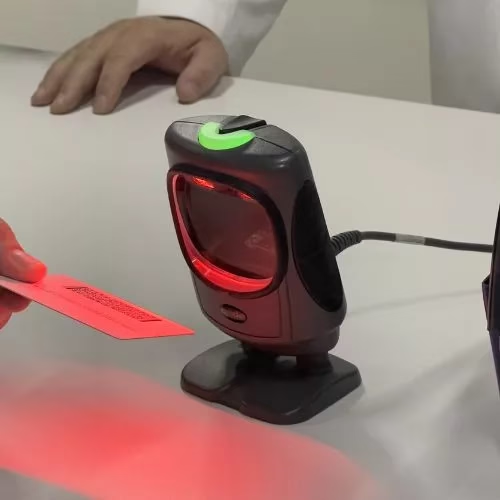
Code Corp CR5000 CR5210-200-C502 – Presentation Scanner, Retail, General Purpose – 2D Area Imager – Dark Gray. Includes: 1.8m Straight RS-232 Cable

Code Corp CR5000 CR5210-200-C502 Fixed Barcode Reader
To use the Code Corp CR5000 CR5210-200-C502 fixed barcode reader, follow these steps:
1. Mount the reader: Mount the Code Corp CR5000 CR5210-200-C502 reader in a stable, well-lit position so that it can easily read barcodes.
2. Connect to power: Make sure the reader is plugged into a power source and turned on.
3. Connect the reader to the reading device: Use the provided RS-232 cable to connect the Code Corp CR5000 CR5210-200-C502 reader to the reading device, such as a computer or terminal, using the RS-232 port.
4. Configure the reader (if necessary): Depending on your needs, you may need to configure the reader. This may involve setting the type of barcodes you will read, the scan speed, the communication mode, etc. You can find detailed instructions in the reader’s manual or contact Code Corp technical support for further assistance.
5. Place the barcode in the scan field: Make sure the barcode is properly positioned in the reader’s scan field. The reader will automatically read the barcode and emit a confirmation signal.
6. Interpret the read data: After the reader has read the barcode, the data should be transferred to the connected reading device. It should interpret and use the data according to your needs.
7. Ensure the reader is properly maintained: During use, ensure that the reader is cleaned and maintained regularly according to the instructions in the user manual. This will ensure optimal long-term operation.
If you are having difficulty setting up or using your Code Corp CR5000 CR5210-200-C502 reader, I recommend that you consult the user manual or contact Code Corp technical support for further assistance.
Only logged in customers who have purchased this product may write a review.

Reviews
There are no reviews yet.