





Barcode Reader Fix Code Corp CR5000 CR5210-200-CX
505,78 € 379,34 € incl. VAT
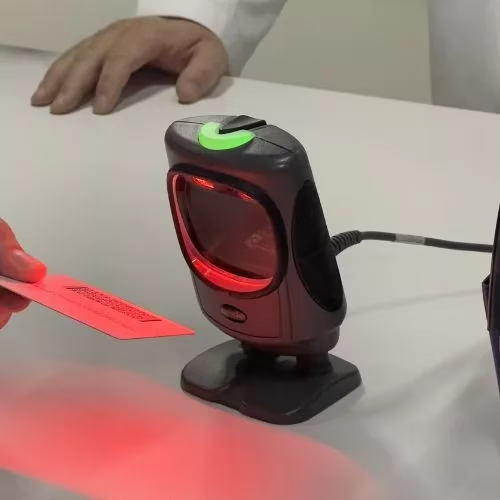
Code Corp CR5000 CR5210-200-CX – Wired Barcode Scanner, Code CR5210, Retail, Presentation, General Purpose, 2D Area Imager, Dark Gray

Code Corp CR5000 CR5210-200-CX Fixed Barcode Reader
To use the Code Corp CR5000 CR5210-200-CX fixed barcode reader, follow these steps:
1. Mount the reader: Make sure the Code Corp CR5000 CR5210-200-CX fixed barcode reader is fixed in a stable and well-lit position so that it can read barcodes easily.
2. Connect it to the power source: Make sure the reader is connected to a power source and turned on.
3. Connect the reader to the reader: Use the cable provided to connect the reader to the reader. Depending on the type of connection available on the reader (e.g. USB, RS-232, etc.), connect the appropriate cable to the appropriate port on the reader.
4. Configure the reader (if necessary): Depending on your needs, the reader may require additional configuration. You can refer to the reader’s user manual for detailed instructions on configuring it.
5. Place the barcode in the scan field: Make sure the barcode is correctly positioned in the reader’s scan field. The reader should automatically read it and provide visual or audible confirmation of the read.
6. Interpret the read data: After the reader has read the barcode, the associated data should be sent to the reader and interpreted according to your needs (for example, in an inventory management system or a sales program).
7. Maintain the reader properly: Clean the reader regularly to remove any debris or dirt that could prevent it from working properly.
If you are having difficulty setting up or using your Code Corp CR5000 CR5210-200-CX reader, please refer to its user manual or contact the manufacturer’s technical support for additional help.
Only logged in customers who have purchased this product may write a review.

Reviews
There are no reviews yet.